Click "Add button" and "Add submenu's item's buttons to create your menu.
You can use ready to use Templates. To do it just select theme you like in the "Button themes" and "Submenu themes" list. Then you can browse this theme's button backgrounds. When you find a button background or submenu theme you like, double-click it to apply.
Select vista button or submenu by clicking it and change button appearance for normal and mouse over states and set buttons/submenus link properties and link target attributes.
Save your menu as project file, as HTML page or insert your menu into the existing HTML page
DROPDOWN MENU JAVASCRIPT
Properties of play button This toolbox is for adjusting the buttons' properties. You can adjust one single button or a group of web page buttons selected with Ctrl/Shift keys at once.
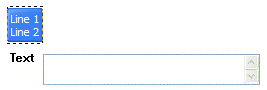
Text - type the button text here. If you want the button to have several lines of text just press "Enter" after typing each line.
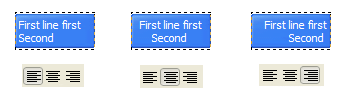
Text alignment - defines text alignment inside the button.
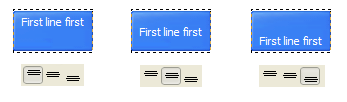
Text offset - text offset in relative coordinates. For more precise text position adjustment.
Link - the link that is to be opened when user clicks the button. For example: http://www.vista-buttons.com. You can also click "Open" icon to the left of the "Link" field to select the page you want to link to.
Link target attribute - link behavior adjustment. Link target attribute tells web-browser where to open the linked page. This attribute represents the Target attribute of the link (<a> tag in HTML). You can either enter your target value in the field or choose from the predefined attribute values in the list.
If you enter your own value, it must be a window or a frame name. Note, that names are case-sensitive. The linked document will then be opened in that window/frame.
Predefined attribute values:
_blank - Browser creates a new window for the linked page.
_parent - Linked page replaces the current frame's framesetting page (if one exists; otherwise, it acts like _self).
_self - Linked page replaces the current page in its window or frame.
_top - Linked page is to occupy the entire browser window, replacing any and all framesets that may be loaded (acts like _self if there are no framesets defined in the window)
If you leave the field clean then the linked page will be opened in the same browser window.
Hint - specifies the tooltip that is shown when you hold the mouse over the button for a few seconds.
Autosize - defines whether the button size is set automatically to accommodate all its contents or not. If not, you should enter the button size manually in the "Width" and "Height" fields.
Width, Height - if "Autosize" property is off then you can enter the button size in these fields.
Pressed - this property is disabled unless your menu type is "3-state toggle". If the menu type is "3-state toggle" and the property is set then the button will be displayed as pressed. Note, that only one button in the menu can be "pressed" at a time.
In the example below, the "Download" web page buttons Pressed property is set.
Color - move slider to change selected buttons' colors.
DESCRIPTION
Double click on the one of the predefined buttons' and submenus templates to apply it to your menu
When the submenu is larger than the visible area of the page the submenu will be automatically decreased. You can use scrollbar to see all submenu items
Build menus completely based on Cascading Style Sheets. It is possible to appoint the individual CSS styles for separate elements of the menu.
Total control of all menu parameters
Each parameter of a html buttons may be easily changed, allowing you to achieve the required result.
You can set such parameters as direction, size, color, font face, font style, shadow, icons, alignment, links, targets, tooltips, word wrap, and other parameters.
Any change can be undone by pressing "Undo" button.
JavascriptDrop DownMenu The javascriptdrop downmenu opens a new window although I haven't set item's target
JavascriptDrop DownMenu The javascriptdrop downmenu opens a new window although I haven't set item's target
Drop DownMenu This script generates a drop downmenu at the top of your pages for site navigation.
JavaScriptDrop Down Boxes So, you have been thinking about adding a drop box for people to navigate your page with. One problem ..how is it done? Below is a sample navigation drop box.
Drop-downMenu Builders Drop-downMenu Builders (Page 1 of 5 ) Dan Wellman evaluates free and commercial software that can help you create menus that expand into sub-menus and are used as a
Drop-downMenu Builders Drop-downMenu Builders (Page 1 of 5 ) Dan Wellman evaluates free and commercial software that can help you create menus that expand into sub-menus and are used as a
Vista Style 4 - JavascriptMenuDropdown - Templates Vista Style 4 - JavascriptMenuDropdown. Deluxe Menu is cross-frame and cross-browser DHTML Javascriptmenu with a lot of powerful features, flexible parameters and easy
JavaScriptDropdownMenu Demo Lorem ipsum dolor sit amet, consectetuer adipiscing elit. Quisque sollicitudin. Fusce varius pellentesque ligula. Proin condimentum purus a nunc tempor pellentesque.
JavaScriptDrop-downMenusJavaScript can be used to make drop-downmenusJavaScript is frequently used for drop-downmenus, but they are usually badly implemented, and unusable if the user
JavaScript DHTML Tutorials Internet has a lot of scripts with the name "Drop DownMenu". One day I needed to make � 2006-2010 Javascript-Array.com
Dynamic Drive DHTML Scripts- AnyLink Drop DownMenu Take a look at the first line, which lets you concurrently define the drop downmenu ["JavaScript Reference", "http://www.javascriptkit.com/jsref/", "efc"], ["CNN", "http
Drop DownMenu This script generates a drop downmenu at the top of your pages for site navigation.
Active DHTML Drop DownMenu in JavaScript With this cross browser Drop DownMenu you will be quickly adding a great drop downmenu navigation aid to web sites, documentation, intranets and much more.
Vista Style 4 - JavascriptMenuDropdown - Templates Vista Style 4 - JavascriptMenuDropdown. Deluxe Menu is cross-frame and cross-browser DHTML Javascriptmenu with a lot of powerful features, flexible parameters and easy
Drop-downMenu Builders Drop-downMenu Builders (Page 1 of 5 ) Dan Wellman evaluates free and commercial software that can help you create menus that expand into sub-menus and are used as a
Vista Style 4 - JavascriptMenuDropdown - Templates Vista Style 4 - JavascriptMenuDropdown. Deluxe Menu is cross-frame and cross-browser DHTML Javascriptmenu with a lot of powerful features, flexible parameters and easy
Drop DownMenu This script generates a drop downmenu at the top of your pages for site navigation.










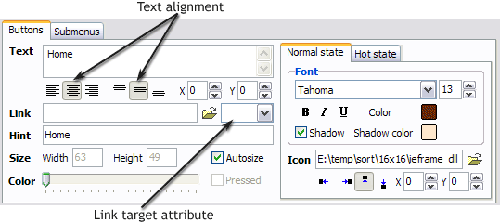 Text - type the button text here. If you want the button to have several lines of text just press "Enter" after typing each line.